Speed is no longer just a technical metric — it’s a business metric. A one-second delay in page load time can reduce conversions by up to 7%, tank your search engine rankings, and frustrate the very customers you’ve worked so hard to attract.
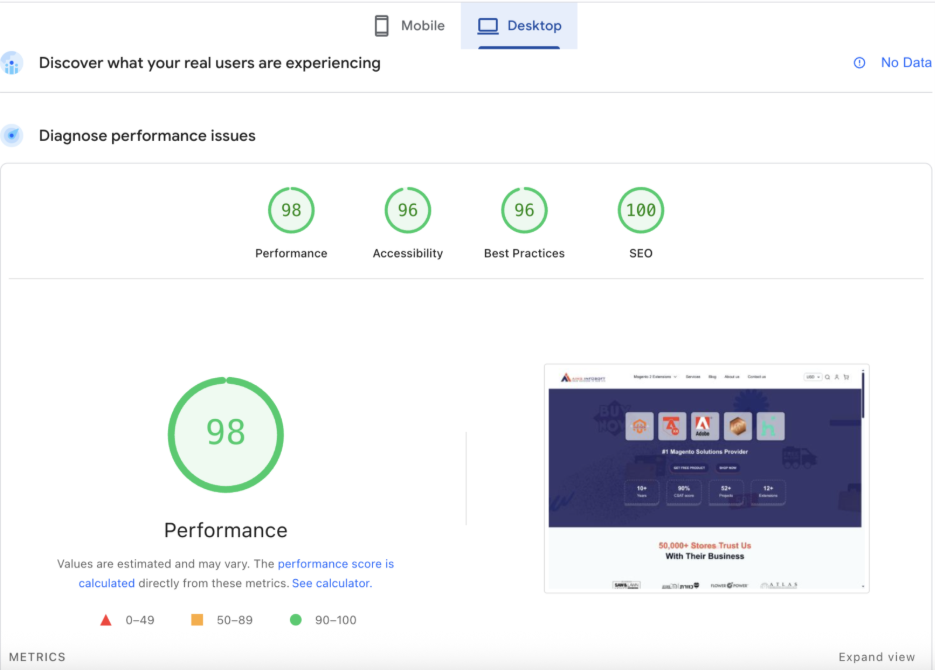
At Aims Infosoft, we recently achieved a 98/100 Performance score, 96/100 Accessibility, 96/100 Best Practices, and a perfect 100/100 SEO score on Google PageSpeed Insights for a Magento 2 store. In this blog, we’re pulling back the curtain on exactly how we did it — and how you can too.
Why Magento 2 Speed Optimization Matters
Magento 2 is one of the most powerful eCommerce platforms on the planet. With great power, however, comes complexity – and without proper optimization, even well-built Magento stores can feel sluggish.
Search engines like Google use Core Web Vitals as a ranking signal. Shoppers abandon slow-loading pages within 3 seconds. The math is simple: a faster store means better rankings, lower bounce rates, and higher revenue.
Why Magento 2 Speed Optimization Matters
1. Enable Full Page Cache (FPC)
Magento 2 ships with a built-in Full Page Cache. Enable it from the admin panel under Stores > Configuration > Advanced > System > Full Page Cache. For production stores, we always recommend Varnish Cache over the built-in cache – it handles thousands of concurrent requests with ease.
2. Use a CDN for Static Assets
Serving static files — images, JavaScript, CSS – from a Content Delivery Network dramatically reduces latency for global visitors. We configure Magento to offload static content to a CDN so assets are always served from the edge node closest to the user.
3. Enable JavaScript Bundling & Merging
Magento 2 makes dozens of JS requests by default. Under Stores > Configuration > Advanced > Developer, enable:
- Merge JavaScript Files
- Bundle JavaScript Files
- Minify JavaScript Files
This reduces both the number and size of JS requests significantly.
4. Optimize CSS Delivery
Similarly, enable Merge CSS Files and Minify CSS Files in the Developer settings. Critical CSS inlining — loading above-the-fold styles inline and deferring the rest – can shave hundreds of milliseconds off your First Contentful Paint (FCP).
5. Image Optimization
Images are typically the biggest culprit of slow Magento stores. Our approach:
- Compress images with tools like ImageMagick or WebP conversion
- Implement lazy loading for off-screen images
- Implement lazy loading for off-screen images
- Leverage Magento 2’s built-in image resizing and caching
6. Upgrade to PHP 8.x
If your server is still running PHP 7.x, upgrading to PHP 8.1 or 8.2 can deliver performance gains of 20–30% or more. Magento 2.4.x fully supports PHP 8.x and takes full advantage of its JIT compilation improvements.
7. Use Redis for Session & Cache Storage
Replace the default file-based session and cache storage with Redis. Redis is an in-memory data store that’s significantly faster at read/write operations, reducing database load and improving TTFB (Time to First Byte).
Configure it in env.php:
'session' => [
    'save' => 'redis',
    ...
],
'cache' => [
    'frontend' => [
        'default' => [ 'backend' => 'Cm_Cache_Backend_Redis', ... ],
        'page_cache' => [ 'backend' => 'Cm_Cache_Backend_Redis', ... ],
    ]
]
8. Database Optimization
Magento 2 is database-intensive. Key optimizations include:
- Run OPTIMIZE TABLE regularly on high-write tables like quote and sales_order
- Clean up old quotes, logs, and sessions via Magento’s built-in cron
- Add indexes to frequently queried columns
- Use a read replica for report queries to reduce load on the primary DB
9. Enable HTTP/2 & GZIP/Brotli Compression
Ensure your server is configured for HTTP/2, which allows multiplexed requests over a single connection. Pair this with Gzip or Brotli compression for all text-based assets (HTML, CSS, JS) to reduce transfer sizes by 60–80%.
10. Lazy Load Third-Party Scripts
Analytics, chat widgets, social sharing buttons — third-party scripts are notorious performance killers. Load them asynchronously or defer them until after the main page content has loaded. This alone can dramatically improve your Largest Contentful Paint (LCP) score.
11. Tune Your Server & Use Elasticsearch
For catalog-heavy stores, replace Magento’s default MySQL search with Elasticsearch or OpenSearch. This improves search performance, reduces DB load, and enables advanced catalog filtering without slowdowns.
12. Audit & Slim Down Extensions
Every third-party extension you install adds code to your store. Conduct a quarterly audit of your extensions — remove unused ones and evaluate performance-heavy ones. Not all extensions are built with performance in mind.
The Results: What 98/100 Looks Like
After implementing these optimizations, here’s what the store achieved on Google PageSpeed Insights (Desktop):
| Metric | Score |
|---|---|
| Performance | 98 / 100 |
| Accessibility | 96 / 100 |
| Best Practices | 96 / 100 |
| SEO | 100 / 100 |
These scores place the store in the top tier of Magento-powered eCommerce sites globally.
Core Web Vitals: The Metrics That Matter
Behind those scores are real user experience metrics:
- LCP (Largest Contentful Paint): How fast the main content loads — ideally under 2.5 seconds
- FID / INP (First Input Delay / Interaction to Next Paint): How quickly the page responds to user interaction
- CLS (Cumulative Layout Shift): How stable the layout is as the page loads
Optimizing all three is what separates a “fast” site from a truly great one.
Need Help Optimizing Your Magento 2 Store?
At Aims Infosoft, we’ve spent over a decade perfecting Magento 2 performance. Our team of certified Magento developers has helped 50,000+ stores worldwide achieve blazing-fast load times, better Google rankings, and higher conversion rates.
Whether you’re starting from scratch or looking to squeeze more performance out of an existing store, we’re here to help.
👉 Contact Aims Infosoft Today to get a free performance audit of your Magento 2 store.